

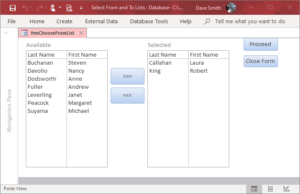
In this example, I provide a simple form allowing the user the option to select entries from an “Available” list to be added to a second “Selected” list. In this scenario, we have an Employee table (tblEmployees) with EmployeeID as the unique field (and primary index). In the listboxes, we only want to show the first and last names, but in order to uniquely identify any selections made by the user, we need to also include EmployeeID as a hidden field (in the listboxes).
By keeping track of the list of Employees selected, by the hidden EmployeeID, we can dynamically adjust each list’s RowSource property to include or exclude employees.
The form opens with the entire list of Employees in the “Available” list, and the “Selected” list is empty (RowSource properties for each list is initialized in the Form_Load event). The user can select one or more entries in the “Available” list (using the Shift or Ctrl keys) then press the [>>>] button to move those entries to the other “Selected” list. A similar button is available to move entries from “Select” to “Available”.
After the selections are complete, there is a Proceed button, which in the example, simply displays the list of EmployeeIDs that the user selected (into the “Selected” list).
Click here to download this example.